
Key takeaways
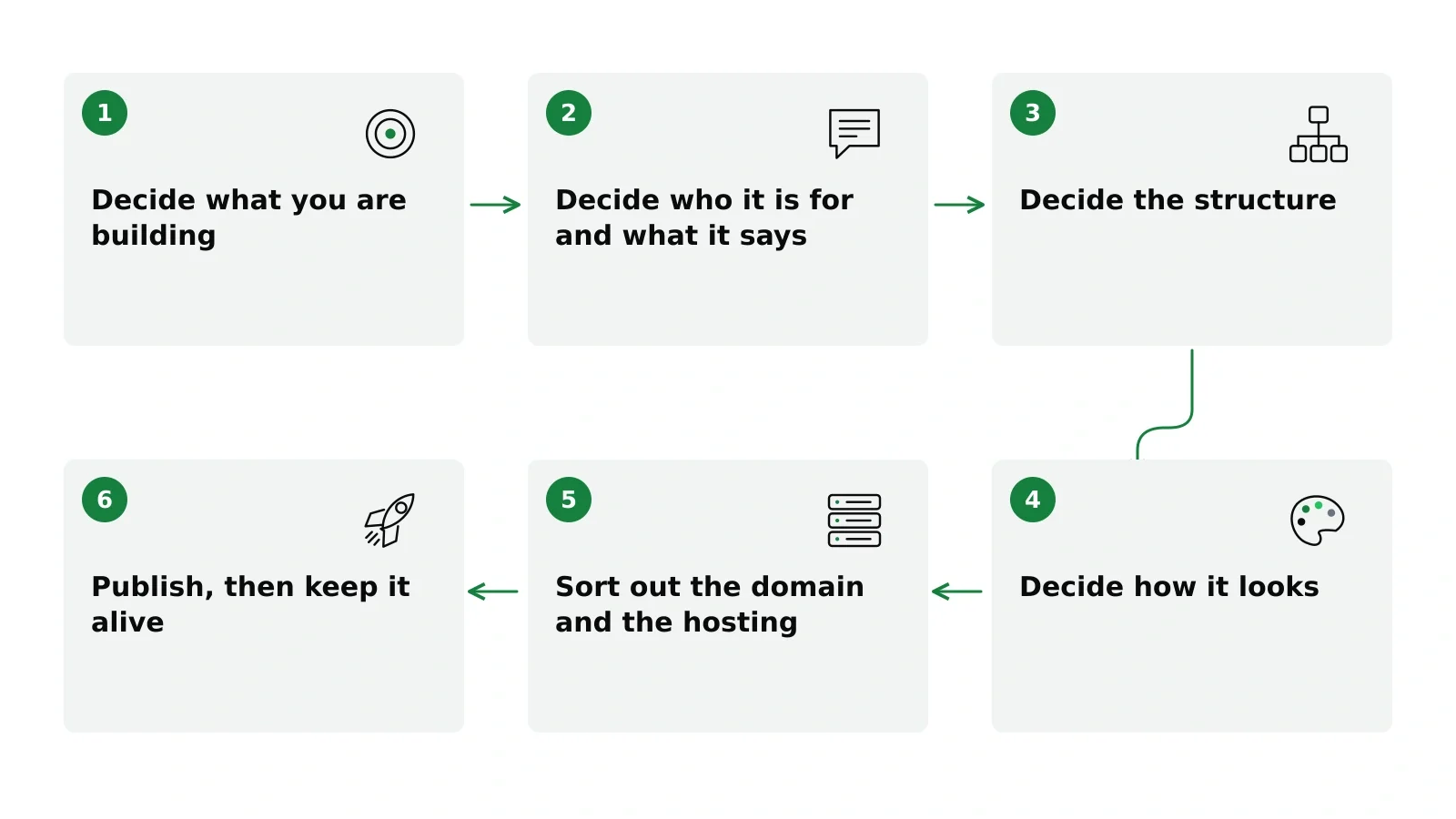
- Building a website is six decisions: what you are building, what it says, how many pages, how it looks, where it lives and how you keep it alive.
- Write the words before you choose the design. Design decisions made around real copy are better decisions.
- Start smaller than feels comfortable. You can add pages later; you cannot easily undo a structure that was wrong from the start.
- Put the domain and the hosting in your own name. They are the two pieces that decide whether you own the site.
- Plan for a little maintenance from day one. It is the price of owning instead of renting.
Many guides with this title are reviews of website builders, often with affiliate links. This one assumes you have already decided to do it yourself and covers what you actually have to decide, in the order the decisions come up.
There are six stages. Realistically it is an afternoon of decisions and a few days of writing, and the writing is the part everyone underestimates. Each stage links to an article that goes deeper.
Stage 1: Decide what you are building
Before anything visual, one question: is this a landing page or a website?
A landing page is one page with one job. Someone arrives, reads and does the thing: signs up, books, buys or calls. If you are testing an idea, launching one offer or need something at the end of a link, this is what you need, and building more is a way of delaying.
A website is several pages doing different jobs, usually with a blog. You need one when different visitors arrive wanting different things, or when you plan to publish over time and be found for it.
People get this wrong in both directions. Some build eight pages for a business that needs one; others cram a whole company onto a single scrolling page. Our article on landing page vs website walks through the choice.
Stage 2: Decide who it is for and what it says
This is the stage people skip, and it decides whether the site works.
Your homepage has a few seconds to answer three questions: what this is, who it is for and what to do next. Not your story and not your values. Those can live on another page.
The usual failure is writing for everyone. “Solutions for businesses of all sizes” says nothing to anyone. “Invoicing for freelance translators who bill in three currencies” is read by fewer people and persuades the ones who matter.
Write this before you look at a single template. We cover it in detail in what should be on a homepage.
Stage 3: Decide the structure
Once you know what the site says, you can decide how many pages it takes to say it. Fewer than you think. A working site for most small businesses is a homepage, a page about what you do, a page about who you are and a way to get in touch. If you offer several distinct services, give each its own page, because that is how people search.
A blog is a separate decision. A blog that gets three posts and stops is a public record of when you gave up. Add one only if you know who will write it and how often.
The structure you set now is the one you will live with, because reorganizing later means changing addresses and losing what those addresses had earned. More in how many pages should a website have.
Stage 4: Decide how it looks
Two parts, in this order: brand, then theme.
Your brand is a color, a typeface or two and a way of writing your name. It takes a couple of hours, and people lose weeks to it. See small business branding for a version you can finish in two hours.
The theme is the layout system everything sits in. Choose it by what your site does, not by which screenshot you liked. An editorial theme is wrong for a five-page service business, and a product-marketing theme is wrong for an essay site. More in how to choose a WordPress theme.
Stage 5: Sort out the domain and the hosting
Both should be in your name.
The domain is your address. Register it yourself, at a registrar, and keep the login. The hosting is where the site lives; for a normal site, shared hosting is enough. What matters is that you hold the account and can move whenever you want.
These two are what make a site yours. Everything else, from theme to content, can move as long as they are in your name. The details are in domain and hosting.
Stage 6: Publish, then keep it alive
Launch before it is perfect. A site that is live and slightly wrong teaches you more than a perfect site nobody can see.
After launch there is a small, regular job: updates, backups and the occasional evening when something needs attention. That is the price of owning rather than renting, and it is better to know it before you start. Our guide to WordPress maintenance covers what it involves, and the website launch checklist covers launch day and the months after.
What this guide leaves out
Two things, deliberately. Getting found is a separate project: building a site well does not make it rank on its own. And building for someone else is a different job with different numbers. This guide is for the person building their own.
Where NoTiesBuilder fits
NoTiesBuilder is our product, so weigh this paragraph accordingly. It is launching soon, and it turns the six stages into a guided path: you answer a brief, agree on the structure, choose a theme and your colors, review a preview, and it builds a WordPress site on your own hosting. You still make every decision, and you still write the words, with AI help on each page from none up to a share of the text, never the whole page. Everything in this guide applies just as well if you do it entirely by hand. If you want to try it when it opens, join the waiting list.
Frequently asked questions
How long does it take to build a website?
For a small-business site, plan on an afternoon of decisions and a few days of writing, spread over a week or two. The building itself is the quickest part once the words are ready.
Do I need to know how to code?
No. Modern themes and editors handle layout without code. What you need is clear decisions and clear writing.
Should I use a website builder or WordPress?
A hosted builder is quicker to start and maintains itself; WordPress on your own hosting is yours to keep and move. Our article on the website you’re renting sets out the trade.
How much does a website cost?
On your own hosting, the running costs are hosting and a domain, paid to the providers you choose. The build is either your time or a one-time fee.