
Key takeaways
- The top of a homepage has one job: say what this is, who it is for and what to do next, before the visitor scrolls.
- Write one sentence that a stranger could repeat. If it needs your industry’s vocabulary to make sense, rewrite it.
- Choose one main action. A second, quieter one is fine; five buttons of equal weight is a menu, not a homepage.
- Below the top, each section should answer a question a real visitor has. Anything that answers a question only you have can go.
- Your history, values and team belong on the About page, not the homepage.
Most homepages are written from the inside out. The business starts with what it is proud of: its story, its values, its range of services. The visitor arrives with a much narrower question: am I in the right place?
A homepage that answers that question fast does most of its job. Everything below the top is there to help the people who said yes.
The first screen: three answers
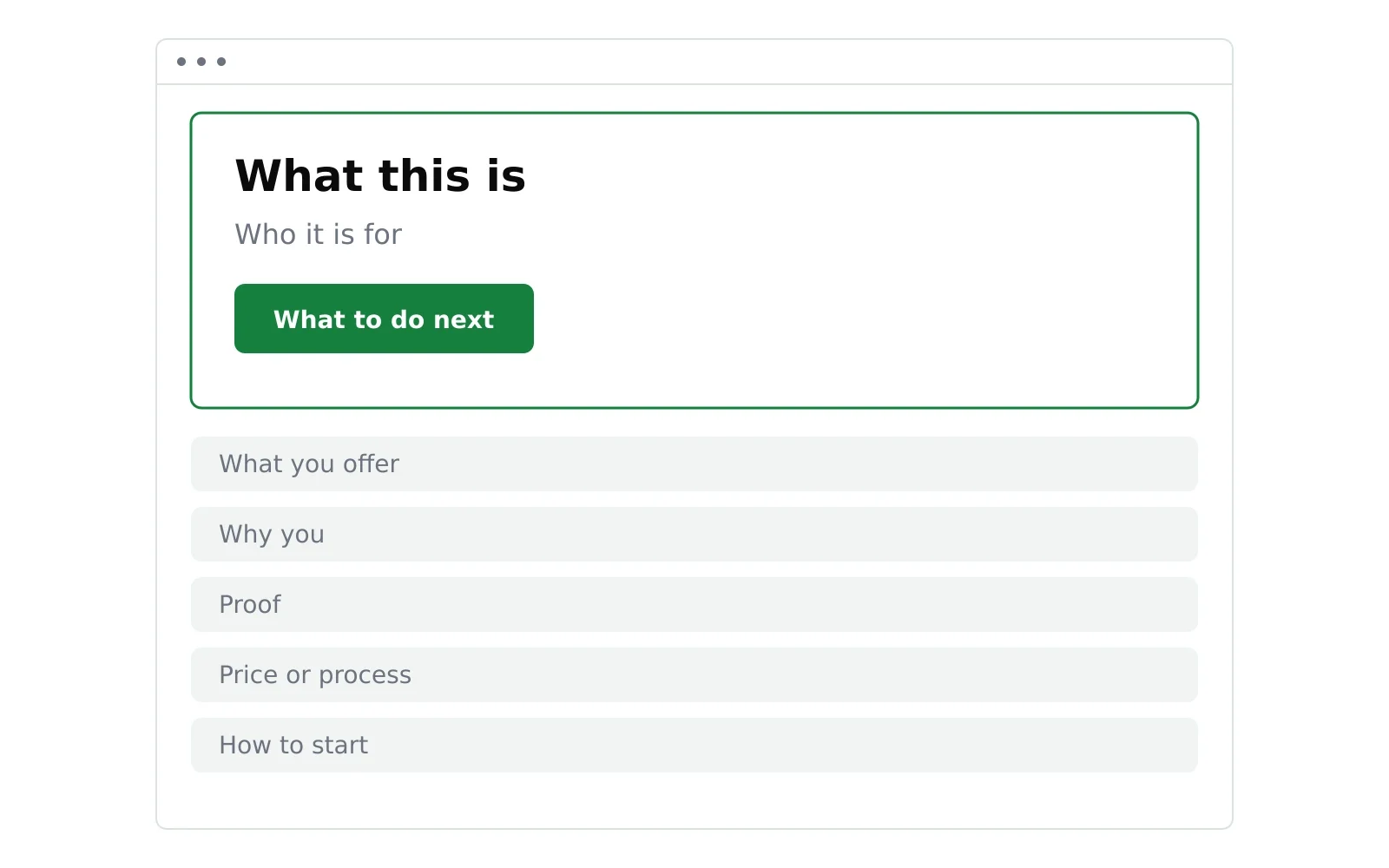
Before anyone scrolls, the top of the page should answer three things.
What this is. One plain sentence. “Bookkeeping for independent restaurants.” “A dog groomer in north Austin, open Saturdays.” “Project management software for architecture studios.” Not a slogan, a description.
Who it is for. Sometimes the first sentence already says it. If not, a short line under it: “For studios of 5 to 50 people.” Naming who it is for also tells everyone else, politely, that this is not for them, and that is useful too.
What to do next. One button with a verb on it: book, call, start, get a quote. If there is a natural second step for people not ready yet, such as seeing prices, make it visibly secondary.
A useful test: show the top of your homepage to someone who does not know your business for five seconds, then hide it. Ask them what you do and what they would click. If they cannot tell you, the sentence is not done.
Writing the sentence
The sentence is the hardest part and the most important. Three common ways it goes wrong:
- Too broad. “Solutions for growing businesses.” Every business could say it, so it tells the reader nothing.
- Too clever. A pun or a metaphor that only works once you already know what the business does.
- Too inside. Jargon from your own field. “Full-stack revenue operations” may be accurate and still mean nothing to the person you want to reach.
Write ten versions. Read them aloud. Keep the one a customer would use to describe you to a friend.
What goes below
Once the top is right, the rest of the homepage answers the questions a visitor has after they decide they might be in the right place. For most small businesses, those are:
- What exactly do you offer? A short overview of your services or products, each linking to its own page.
- Why you? Two or three concrete reasons. Specific beats general: “same-week appointments” is better than “great service”.
- Can I trust you? Real evidence: client names you have permission to use, genuine reviews, years in business, a certification that matters in your field.
- What does it cost, or how does it work? Either prices, a starting price or the steps from first contact to done. Hiding all of this sends people to a competitor who does not.
- How do I start? The same main action as the top, repeated at the bottom for people who read everything.
Not every site needs all five. A one-offer business may need three. The order matters more than the count: answer the most common question first.
What to cut
A few things often appear on homepages and rarely help.
- A long welcome message. “Welcome to our website” uses the most valuable line on the page to say nothing.
- Your full story. It matters, to some visitors, after they are interested. That is what the About page is for.
- Rotating sliders. Many visitors never get past the first slide. Pick the one message that matters and show it.
- Every service at equal weight. If one service brings most of your work, make it lead.
- Social media feeds. They send visitors away from your site at the moment they were deciding to stay.
A homepage is never quite finished
You will not get it perfect the first time, and you do not need to. Launch with a clear sentence and one action, then watch what visitors do. If they leave from the top, rewrite the sentence. If they scroll but do not act, look at the evidence and the price section.
For the bigger picture of building the rest of the site, see our guide on how to build a website. If you are deciding whether you need more than one page at all, read landing page vs website.
Where NoTiesBuilder fits
NoTiesBuilder is our product and is launching soon. Its brief will ask for the sentence, the audience and the main action before anything else, and build the homepage around your answers.
Frequently asked questions
How long should a homepage be?
Long enough to answer the questions your visitors actually have, and no longer. For many small businesses that is four to six sections. Length matters less than whether the top is clear.
Should my homepage have a video?
Only if the video shows something words and a picture cannot, such as how a product works. A background video that plays behind the headline usually slows the page down without adding meaning.
Should I put prices on my homepage?
If your prices are simple, yes, or at least a starting price. If they vary a lot, explain how pricing works and link to a page with more detail.
How often should I change my homepage?
Change it when what you do changes, or when you see that visitors are not doing what you hoped. Changing it constantly makes it hard to tell what works.