
Key takeaways
- Start from the shape of your content: a product or service site, an editorial site, a portfolio or a directory. Each needs a different kind of theme.
- Judge a theme with your own words, not its demo. Demos are written to flatter the design.
- Check the boring pages: a blog post, a long page of text, the 404 page, a form and the mobile menu.
- Prefer block themes that use the site editor and theme styles. Colors and typefaces then change in one place.
- Colors, typefaces and layouts are easy to change later. The underlying structure of a theme is the part that is hard to change.
The WordPress theme directory lists thousands of free themes, and commercial marketplaces list thousands more. Most people choose the same way: scroll until a screenshot looks right, install it, then spend a week trying to make their content look like the demo.
There is a better order. Decide what your site is, then look for themes built for that.
Step 1: know the shape of your site
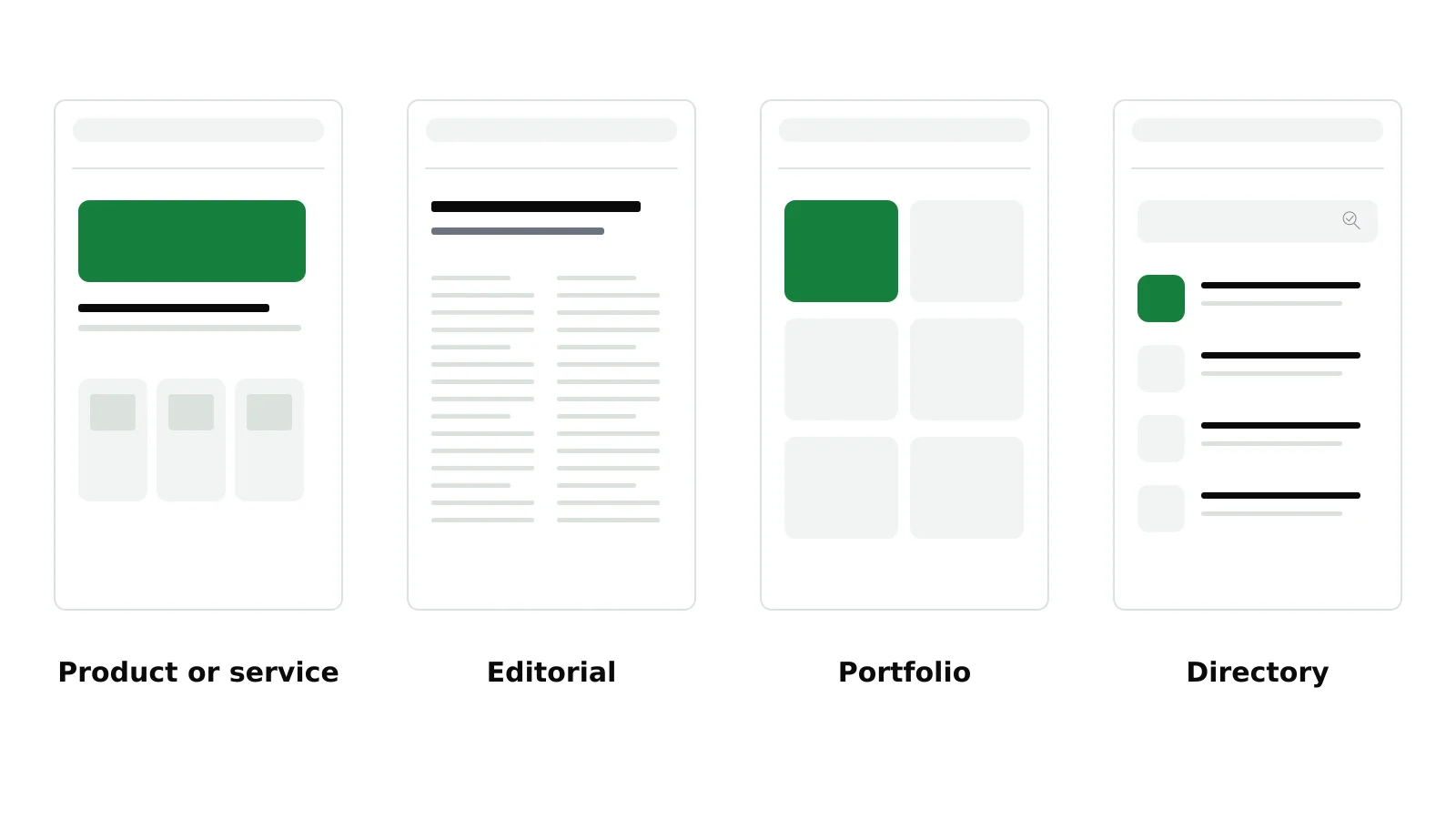
Almost every website falls into one of four shapes.
Product or service. A homepage that explains an offer, pages for each service or product, prices and a strong call to action. Most small-business sites are this shape. It needs a theme with good section layouts: features, pricing, testimonials, frequently asked questions.
Editorial. The content is the product: articles, guides, a magazine or a newsletter archive. It needs a theme that is excellent at long text, with readable type, sensible archives and good article pages.
Portfolio. The work speaks: photographers, designers, architects, studios. It needs a theme that presents images and projects well and stays out of the way.
Directory. Many similar entries that people browse and filter: listings, locations, members, resources. It needs a theme, often with a plugin, that handles structured entries and search.
A theme designed for one shape can be bent toward another, but you will fight it the whole way. Picking the right shape first eliminates most of the theme directory.
Step 2: judge it with your own content
A theme demo is a piece of marketing. The headlines are short, the photos are professional and every section is filled with exactly the right amount of text.
Your site will not look like that, and that is fine. Before you choose, take your real homepage sentence, a real paragraph about your service and a real photo, and imagine them in the theme. Better still, install it on a test site and paste them in. A theme that only looks good with perfect content is not a good theme for you.
Step 3: check the boring pages
The homepage gets the attention. The pages your visitors actually spend time on often get none. Before you commit, check:
- A blog post or long page. Is the text comfortable to read? Is the line length sensible on a wide screen?
- The mobile menu. Does it open cleanly, and can you reach every page?
- A form. Contact forms and signup forms should look like part of the site, not an afterthought.
- The 404 page. It will be seen more often than you expect.
- Archives and search results. If you plan a blog, these pages matter.
Step 4: check how it is built
A few technical checks save trouble later. You do not need to be a developer to make them.
- Block theme or classic theme. Block themes use the WordPress site editor: you change headers, footers, colors and typography in one place, visually. For a new site, a well-made block theme is usually the simpler choice.
- Updates. When was it last updated? A theme that has not been updated in a long time may not keep up with new versions of WordPress.
- Speed. Run the demo through a page speed test. A theme that is slow before you add anything will not get faster.
- Lock-in. Some themes come with their own page builder or many required plugins. The more a theme does in its own proprietary way, the harder it will be to switch later.
Step 5: decide what you can change later
People worry too much about getting the look exactly right, and too little about the structure.
Easy to change later: colors, typefaces, the logo, spacing, most section layouts and the content of the header and footer. In a good block theme these are settings.
Hard to change later: how the theme stores your content. If your pages are built with a theme-specific builder or custom fields only that theme understands, switching themes can mean rebuilding pages. A theme that uses standard WordPress blocks keeps your content portable.
So choose for structure and portability, and treat the look as something you will refine.
Personality, last
Once a theme fits your shape, handles your content and is well-built, then choose on personality. Calm or bold, warm or technical, spacious or dense. This is where your brand comes in: your color and typefaces on top of a theme with the right character.
For where this fits in the bigger process, see how to build a website.
Where NoTiesBuilder fits
NoTiesBuilder is our product and is launching soon. The themes it will use are block themes made by The Web Architecture, the company behind NoTiesBuilder. Each one is designed for a particular shape of site and comes with several starters. You will choose the theme and starter that fit, then apply your colors and type. Because content is stored in standard WordPress blocks, switching themes later mostly changes the look.
Frequently asked questions
Should I use a free or a paid WordPress theme?
Either can be good. What matters is that the theme fits your kind of site, is updated regularly and keeps your content in standard WordPress blocks.
Can I change my WordPress theme later?
Yes. If your content is in standard blocks, switching themes mostly changes the look. If it depends on a theme-specific builder, switching can mean rebuilding pages.
What is a block theme?
A WordPress theme built for the site editor, where headers, footers, templates, colors and typography are edited visually and built from blocks rather than PHP templates.
How do I know if a theme is fast?
Test its demo with a page speed tool such as PageSpeed Insights before you install it. Then test your own site again after you add your content.